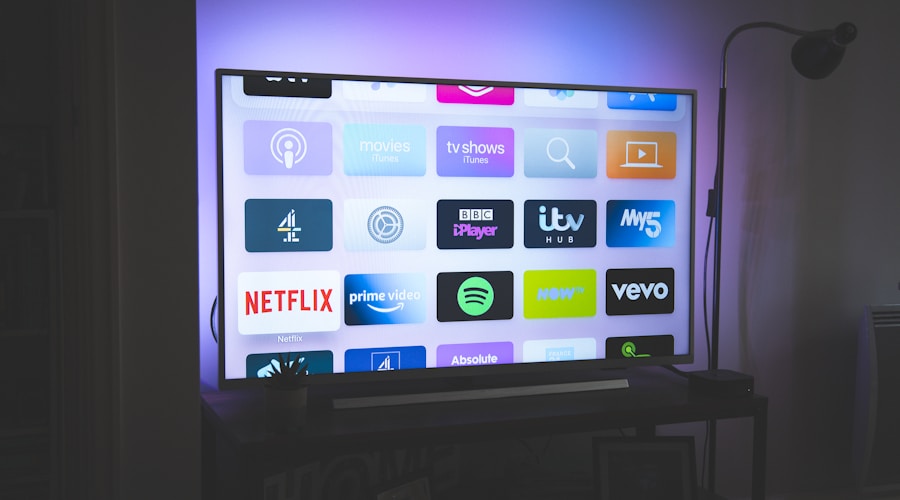
Remember when you bought a TV and that was it? You plugged it in, connected the antenna, and watched whatever was on. The TV cost money once. The content was free (or came through a single cable bill). Life was simple. Then someone invented the smart TV, and suddenly your television became an infinitely hungry portal to an ever-expanding universe of monthly fees.
The modern smart TV is essentially a 65-inch subscription billboard. You turn it on and are greeted not by content, but by a grid of apps, each representing a different monthly payment. Netflix here, Disney+ there, HBO Max in the corner, Hulu waving at you from the recommended section. Your TV's home screen is a shopping mall, and you're paying rent at every store.
The average American household now spends $61 per month — $732 per year — on streaming and TV-related subscriptions. That's more than many people paid for cable, which is deeply ironic considering the entire point of cord-cutting was to save money. Let's break down exactly where that money is going and, more importantly, where you can claw some of it back.
The True Cost of Owning a Smart TV in 2026
Let's build a typical household's smart TV expense stack. This is what we call the "layer cake of regret":
Layer 1: The base streaming services. Netflix Standard ($17.99), Disney+ ($13.99 no ads), and Hulu ($17.99 no ads). That's $49.97/month for what most people consider the "essentials." Already more than the ad-supported cable equivalent many households left behind.
Layer 2: The "I need one more" services. HBO Max ($16.99), Apple TV+ ($9.99), and Amazon Prime Video (effectively $8.25/month as part of Prime). That's another $35.23/month. Your total is now $85.20/month. Congratulations: you're spending more than cable and you still can't watch live sports.
Layer 3: The live TV replacement. YouTube TV ($72.99), Hulu + Live TV ($76.99), or Fubo ($79.99). If you want live sports, news, and network TV without a cable box, you're adding $73-80/month. Your total: $158-165/month. You've recreated cable at twice the price across twelve different apps. Progress!
Layer 4: The premium channel add-ons. Starz ($9.99), Showtime ($11.99), Paramount+ ($12.99). These get added one at a time, usually to watch a specific show, and then linger on your credit card for months after you've finished it. Each one feels small. Together, they're $35/month of content you watch approximately twice.
The Subscription Gateway Drug: Your TV's Interface
Smart TV manufacturers aren't innocent bystanders in this spending spiral. They're active participants — and profiteers. Here's a fun fact that changes how you look at your TV: major manufacturers sell smart TVs at or below cost because they make money from the software, not the hardware.
Roku's business model is explicitly built around advertising and content promotion revenue. They can sell you a TV cheaply because the real revenue comes from promoting paid apps on the home screen, taking a cut of subscriptions initiated through the platform, and selling advertising on the interface. Your TV is, in a real sense, an ad-delivery device that occasionally shows you the content you actually want to watch.
Samsung, LG, and other manufacturers have adopted similar models. Samsung TV Plus offers free channels but prominently promotes premium upgrades. LG's webOS interface features sponsored recommendations. Every time you turn on your TV, you're being marketed to by the TV itself.

The Hidden Costs You Probably Forgot About
Cloud DVR fees. YouTube TV includes unlimited cloud DVR, but other live TV services charge extra or limit storage. Hulu + Live TV's "Enhanced Cloud DVR" is an additional $9.99/month. That's $120/year for the ability to fast-forward through commercials on recordings — a feature that was free with every VCR made since 1975.
4K/HDR upcharges. Netflix charges $22.99/month for its Premium plan, which is the only tier that includes 4K streaming. You bought a 4K TV specifically for the picture quality, and now you're paying a premium for content that actually uses it. Disney+ at least includes 4K in all paid plans, but others follow Netflix's lead in charging more for the resolution your TV was designed to display.
Multi-device fees. Want to watch on the TV in the bedroom too? Netflix Standard only allows 2 simultaneous streams. A family of four with viewing conflicts needs the Premium plan. Disney+ recently introduced a limit on simultaneous streams for cheaper tiers. These limits are designed to push you toward more expensive plans.
The rental/purchase layer. Even with multiple streaming subscriptions, not everything is included. New movies often require a $5.99 rental or $19.99 purchase on top of your subscriptions. These one-time charges are easy to click "yes" on and hard to track over time. The average household spends an additional $15-20/month on digital rentals and purchases.
Why Your Smart TV Is Designed to Make You Overspend
The psychology of smart TV interfaces is fascinating and slightly diabolical. Traditional TVs had channel numbers — you had to actively seek content. Smart TVs use algorithm-driven recommendation engines that surface content designed to keep you watching and, more importantly, subscribing.
When your Roku home screen shows you a trailer for a show on a service you don't subscribe to, followed by a "Start Free Trial" button, that's not a helpful suggestion. That's a conversion funnel. The interface is optimized to get you to sign up for services with the minimum possible friction — one click and you're subscribed.
Free trials are the sharpest tool in this toolkit. Nearly every streaming service offers a 7-day free trial accessible directly from your smart TV interface. The conversion rate from free trial to paid subscription is 60-80% across the industry, primarily because people forget to cancel. Your TV's home screen is, in effect, a free trial vending machine.
The Cord-Cutting Math Revisited
The original cord-cutting pitch was compelling: ditch your $89/month cable bill, subscribe to Netflix for $8, and save $80/month. In 2015, this math worked. In 2026, it's been shredded by the proliferation of must-have streaming services and price increases across the board.
Today's realistic cord-cutting math looks more like this: Netflix ($17.99) + Disney+ ($13.99) + one live TV service ($72.99) = $104.97/month. Add internet ($60/month, which you need regardless but previously was bundled with cable at a discount) and you're at $165/month. Cable in 2020 averaged $89/month. The savings have evaporated for households that want comparable content coverage.
The one advantage cord-cutters retain is flexibility. Unlike cable contracts, streaming subscriptions can be cancelled and restarted month-to-month. This flexibility is the key to making cord-cutting financially sensible — but only if you actually exercise it.
The Salvation: How to Cut Your Smart TV Costs in Half
Embrace the rotation strategy. You don't need Netflix, Hulu, Disney+, and HBO Max simultaneously. Subscribe to one or two at a time. Watch what you want over 1-2 months, cancel, and switch to the next service. Most popular shows will still be there when you rotate back.
Use free ad-supported services. Pluto TV, Tubi, Samsung TV Plus, The Roku Channel, and Amazon Freevee offer thousands of movies and shows for free with ads. The content isn't cutting-edge, but it's surprisingly watchable. A surprising amount of quality content is available for $0 if you're willing to see a few commercials.
Get a digital antenna. For $20-40 one-time cost, a digital antenna gives you local channels in HD for free — forever. Live sports, news, and network shows without any subscription. This is the most underrated tool in the cord-cutter's arsenal.
Audit ruthlessly. Check the last time you opened each streaming app on your TV. If you haven't opened an app in 30 days, cancel the subscription. You can always re-subscribe. Use Subcut to see all your TV-related subscriptions in one place and get reminders before auto-renewals hit.
Check for bundled freebies. Your phone carrier, credit card, or internet provider may include free streaming subscriptions. T-Mobile includes Netflix and Apple TV+. Many credit cards offer streaming credits. Your ISP may bundle Peacock or other services. Check before paying separately for something you already have access to.
Your smart TV was supposed to liberate you from the cable company's grip. Instead, it scattered that grip across a dozen different companies, each charging a little less individually but more collectively. The TV industry traded one big bill for many small ones and bet — correctly — that you'd lose track. The antidote is awareness. Count every subscription, question every renewal, and remember: the smartest thing about your smart TV should be you, not the upselling algorithm.